|
OBDKey Software
OBDKey has
first class original software supplied on a 2.0 GB USB flash drive (memory stick) with each product.
* - OBD-II plus
enhanced fault code reading, including manufacturer specific codes for many
makes and models. Learn more.
 Software Updates
Request updated software here
Software Updates
Request updated software here
Engine Access Test Support Program
Download and run this test program on your Windows PC to connect to
your OBDKey
hardware. Useful for providing feedback on your car's diagnostic
system. For USB and Bluetooth only (serial interface).
OBDKey for
PC - designed
for your Windows PC
OBDKey for
Pocket PC
- designed for your
Windows Mobile 5.0 and Windows Mobile 6.x devices
OBDKey for
Smartphone
- designed for your Windows Mobile 5.0 and Windows Mobile 6.x devices
OBDKey for
Palm
- designed for your Palm PDA
OBDKey for
Android
- "OBDKey
Mobile", "OBDKey Fault
Code Reader" and "ECU
Access Tester" available from the
Google Android MarketPlace.
Recommended 3rd Party Applications
for Windows PC, Google Android Devices, Apple Macs, Apple iPhones and iPod
Touches and Java Based Phones

OBDKey Makes the Connection
OBDKey
makes the connection between your car and your own computer (PC, PDA, Palm
or mobile phone) so you can see what is happening
inside yours car's electronic systems.
OBDKey uses
your Windows PC, Windows Mobile phone, Android Phone, iPhone / iPod Touch, Palm handheld or mobile phone computer to
provide a flexible vehicle testing tool using the computing power you
already own.
The software
supplied on a 2.0 GB USB flash drive (memory stick) with the OBDKey vehicle interface is simple to
install, simple to manage and understand, and provides powerful insights to
the workings of your vehicle's electronic systems.
All the
software is supplied is included on a 2.0 GB USB flash drive (memory stick) with the OBDKey unit at no
extra cost and with no on-going costs. Support and updates will be provided
from this web site for the OBDKey vehicle interface.
OBDKey is
shipped with vehicle diagnostic software applications for mobile phones, handheld
computers and portable computers.

Software
included for Windows Pocket PC (PDA, Mobile)
OBDGauge -
The Classic OBD Software for the Pocket PC. Enhanced with night time
mode colours!
-
Supports
Windows Mobile 6.0 (WM6),
Windows Mobile 5.0 and earlier versions of Pocket PC.
-
Supports both landscape and
portrait views
-
Requires a
minimum of .Net Compact Framework 1.0 to be installed (the redistributable
package is supplied) .Net Compact Framework 2.0 or better is required for
Windows Mobile 6.
-
Displays live
sensor data
-
Fully automated
-
Connection via
Bluetooth or USB port (where the device supports)
-
Last connection
recalled from memory for faster connection.
-
Access from
COM1 to COM8
-
Day time and
night time colour options to assist in dark or bright conditions
-
Reads
diagnostic trouble codes
-
Clears the
"check engine" (MIL) light, freeze frames and all trouble codes.
-
Diagnostic
Trouble Codes (DTC) description for generic trouble codes
-
Log to a binary
file for reading back with Microsoft Excel or other data and spreadsheet
packages.
-
Display sensor
data in SI (metric), US (imperial) or UK (as SI, but with miles shown for
distances) units.
-
Graphed sensors
show maximum, minimum, and current values.
-
Performance
monitors included for time and distance measurements between two speed
settings (e.g. 0 to 60 mph) and fixed distance runs (say 1/4 mile testing)
-
Fully automatic
demonstration mode supported.
Windows
Mobile System Requirements
Pocket PC
devices running Windows Mobile 6, Windows Mobile 5, Pocket PC 2002 or Pocket
PC 2003 (4.2).
Microsoft
ActiveSync 3.5 or higher (if your computer is running an operating system
other than Windows 7 or Windows Vista), or Windows Mobile Device Center 6.1
or higher (if your computer is running Windows 7 or Windows Vista)
2 MB (minimum)
free space on the device where OBDKey software, fault code database and all
other components are installed on the device.
 |
 |
|
OBDGauge - Intro Screen |
OBDGauge - Engine Codes
Screen |
 |
 |
OBDGauge - Day Time
Colours Sensors
(simulated data) |
OBDGauge - Day Time
Colours More Sensors
(simulated data) |
 |
 |
OBDGauge - Night Time
Colours Sensors
(simulated data) |
OBDGauge - Night Time
Colours More Sensors
(simulated data) |
 |
OBDGauge - Landscape
Mode Supported
(simulated data) |
|
|
|
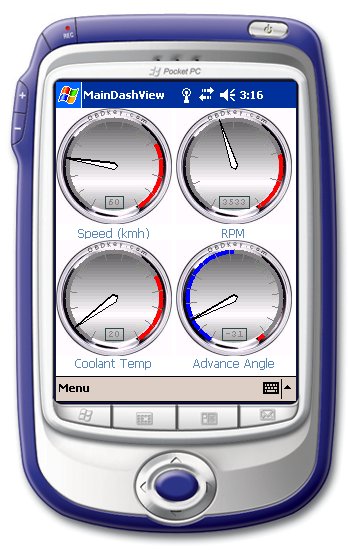
NEW
DashView
- Use your Pocket PC for a more graphical representation of your
vehicle's performance data
-
Supports
Windows Mobile 5.0 and earlier versions of Pocket PC.
-
Requires a
minimum of .Net Compact Framework 1.0 to be installed (the redistributable
package is supplied)
-
Displays live
sensor data
-
Fully automated
-
Connection via
Bluetooth or USB port (where the device supports)
-
Last connection
recalled from memory for faster connection.
-
Access from
COM1 to COM8
-
Day time and
night time colour options to assist in dark or bright conditions
-
Each gauge has
a high and low coloured dial which may be set by the user.
-
Fully automatic
demonstration mode supported.
 |
 |
|
DashView
- Introduction |
DashView
- Options |
 |
 |
DashView
- Day time view of Dials
(simulated data) |
DashView
- Night time view of Dials
(simulated data) |
Software
included for Windows PC
-
Supports
Windows 8, Windows 7, Vista, XP, 2000, 98 and Me.
-
Displays live
diagnostic sensor data
-
Reads
diagnostic trouble codes
-
Reads freeze
frame data
-
Reads oxygen
sensor parameters
-
Clears the
"check engine" (MIL) light, freeze frames and all trouble codes.
-
Fully automated
-
Connection via
Bluetooth or USB port.
-
Last connection
recalled from memory for faster connection.
-
Access from
COM1 to COM99
-
Diagnostic
Trouble Codes (DTC) description for generic trouble codes
-
Graphs for
sensors with automatic height adjustment to highlight small variations in
data patterns
-
Oxygen sensor
monitoring test results
-
Continuous
monitors results and status supported.
-
Log to a comma
delimited file for reading back with Microsoft Excel or other data and
spreadsheet packages.
-
Records VIN
from the vehicle, when the vehicle supports it.
-
OBD compliance
for the vehicle under test is displayed
-
Display sensor
and freeze frame data in SI (metric), US (imperial) or UK (as SI, but with
miles shown for distances) units.
-
Highlighted
sensors show maximum, minimum, average and current values.
-
Performance
monitors included for time and distance measurements between two speed
settings (e.g. 0 to 60 mph) and fixed distance runs (say 1/4 mile testing)
-
Incorporates
ScanFrame feature to capture all sensors readings at the click of a button.
-
Fully automatic
demonstration mode supported.
Windows
System Requirements
Windows 2000,
Windows XP, Windows Vista, Windows 7, Windows 8 133 MHz or higher Pentium compatible CPU. 64 MB
RAM minimum, 300 MB (minimum) hard disk space where OBDKey software, fault
code database and all other components are installed.

OBDKey PC - Loading Software
and Fault Code Database

OBDKey PC - Sensors View
(simulated data)

OBDKey PC - Detailed Sensor
Data View

OBDKey PC - Capture a snap
shot of all sensors at any time with a ScanFrame
(simulated data)

OBDKey PC - Performance
Measuring (Speed and Distance)
(simulated data)

OBDKey PC - Oxygen Sensor
Test Limits as Reported by ECU
(simulated data)

OBDKey PC - ECU On Board
Test Monitors
(simulated data)

OBDKey PC - Freeze Frame
Data Table
(simulated data)

OBDKey PC - Fault Code Data
Tables
(simulated data)
Software included for
Windows Smartphones
-
Supports
Windows Mobile 5.0 for Smartphone, Windows Mobile 2003 Second Edition for
Smartphone, Windows Powered Smartphone 2003
-
Displays live
diagnostic sensor data
-
Reads
diagnostic trouble codes
-
Reads oxygen
sensor parameters
-
Clears the
"check engine" (MIL) light, freeze frames and all trouble codes.
-
Fully automated
-
Connection via Bluetooth
-
Last connection
recalled from memory for faster connection.
-
Diagnostic
Trouble Codes (DTC) description for generic trouble codes
-
Continuous
monitors results and status supported.
-
Displays sensor
data in SI (metric) units
-
Sensors data colour coded for increasing and decreasing values.
-
Fully automatic
demonstration mode supported.
Windows
Mobile Smartphone System Requirements
Before
installing the OBDKey software on your Windows Mobile Smartphone, you must
install the following software on your computer.
-
Microsoft
ActiveSync 3.5 or higher if your computer is running an operating system
other than Windows Vista
-
Windows Mobile
Device Center 6.1 or higher if your computer is running Windows 7 or
Windows Vista
OBDKey software
is for Mobile Powered Smartphone devices running Windows Mobile 2003 (4.2),
Windows Mobile 5, or Windows Mobile 6.
2 MB (minimum)
free space on the device where OBDKey software, fault code database and all
other components are installed on the device.
 |
 |
 |
|
OBDKey SPV - Connection |
OBDKey SPV - Live Data
Display
(simulated data) |
OBDKey SPV - MIL status,
fault codes and inspection and maintenance monitors
(simulated data) |
Software included for Palm
devices
NEW VERSION
- Includes Support for
Palm TX
-
Displays live
sensor data
-
Connection via Bluetooth
-
Last connection
recalled from memory for faster connection.
-
Reads
diagnostic trouble codes
-
Clears the
"check engine" (MIL) light, freeze frames and all trouble codes.
-
Diagnostic
Trouble Codes (DTC) description for generic trouble codes
-
Log to a binary
file for reading back with Microsoft Excel or other data and spreadsheet
packages.
-
Display sensor
data in SI (metric), US (imperial) or UK (as SI, but with miles shown for
distances) units.
-
Graphed sensors
show maximum, minimum, and current values.
-
Performance
monitors included for time and distance measurements between two speed
settings (e.g. 0 to 60 mph) and fixed distance runs (say 1/4 mile testing)
Palm Screen Shots
Palm System
Requirements
Palm OS 3.5,
4.0, 4.1 or 5.0. Palm Desktop 4.0 or 4.01. 2 MB (minimum) free space on the
device where OBDKey software, fault code database and all other components
are installed on the device.
Got a Software Request? -
info@obdkey.com
|